Redesign Cloud Dashboard
Overview
Redesigned the Cloud platform dashboard to enhance user satisfaction and accessibility by introducing personalized marketing content and user-driven notifications. This data-backed approach enabled the successful onboarding of AWS, directly aligning the platform with evolving customer needs and expanding service offerings.
Role
Product Designer
I helped lead the design team through problem discovery, user needs identification, UX strategy development, rapid iterations, and A/B testing to shape a solution that addressed both user and business goals.
Keywords
Growth Design
Vendor Integration
Data-Validated Iteration
↑ 4% increase
in revenue
✓ AWS Integrated
to expand service offerings and flexibility
What is the Cloud Platform?
A B2B SaaS marketplace streamlining cloud service management. It enables businesses to purchase and scale solutions from Microsoft, Adobe, and AWS via a unified procurement platform.
Problem: High Traffic, Low Engagement
Using Microsoft Clarity heatmaps, we identified low engagement and underutilized dashboard space. The lack of clear content hierarchy and a dedicated notification area led to user complaints and missed communication opportunities.
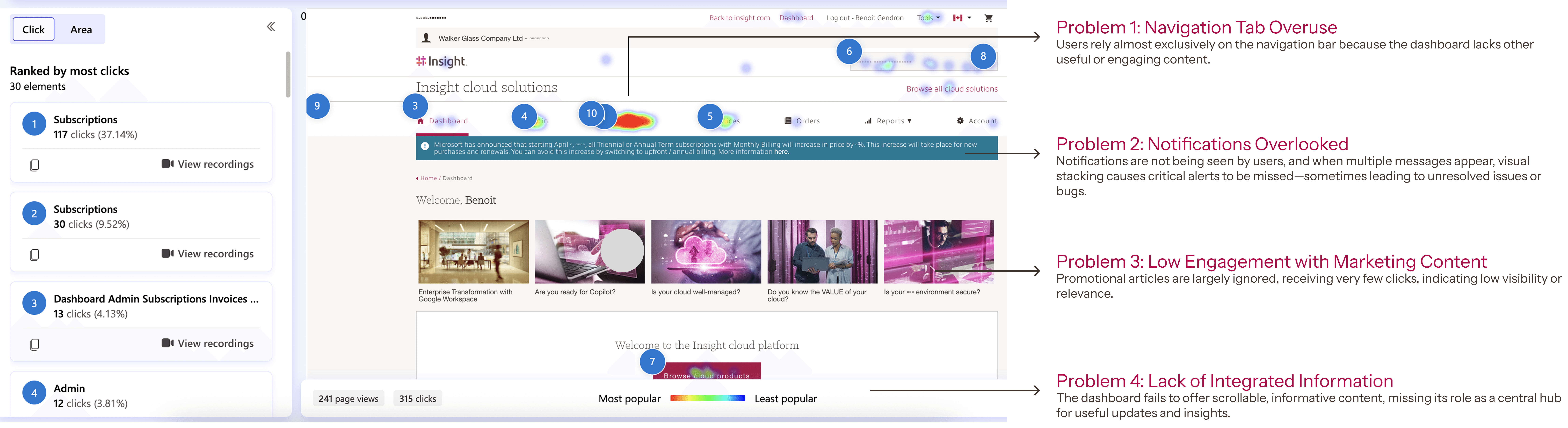
Challenge:
The dashboard needed to display a wide range of information, making prioritization difficult.
Multiple cross-functional teams were involved, each with different goals and requirements.
Aligning internal stakeholders while keeping the end-user experience at the center was critical.
We had to deeply consider what users actually needed and expected from the dashboard.
Solution

Design Process
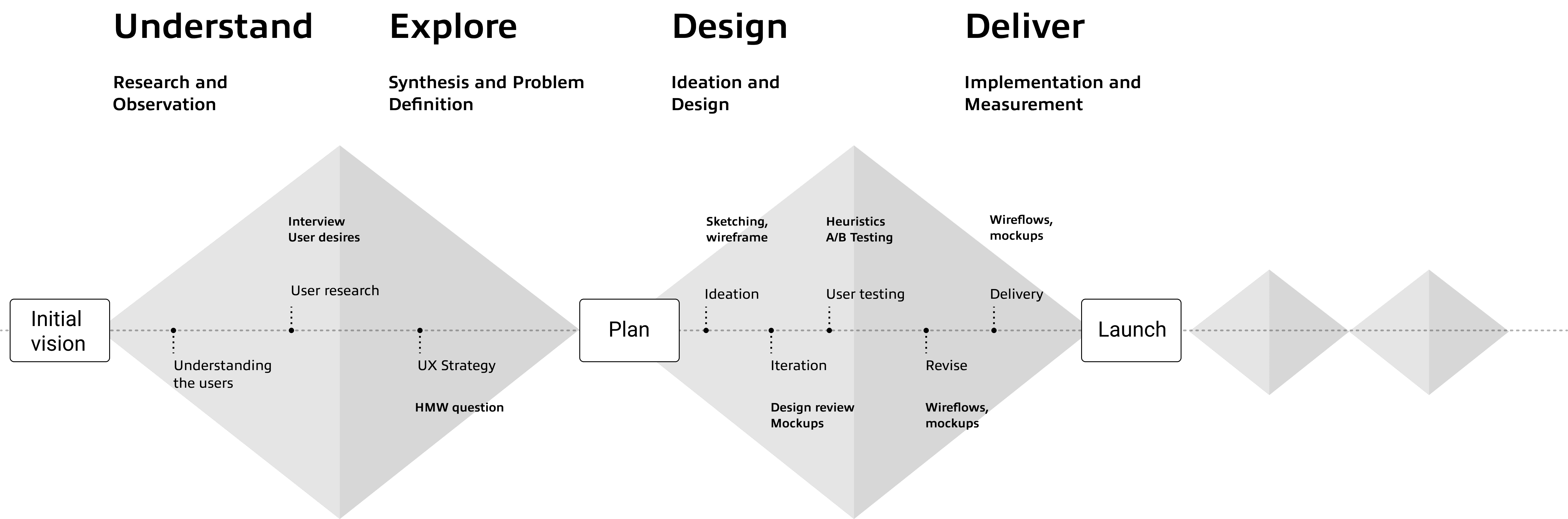
Phase 1: Understand
Who are the stakeholders?
1: ASM Users (Internal Support Team)
Internal team members who access the platform to support customers, troubleshoot issues, and manage service-related tasks.
2: Resellers
Partners who manage multiple end-user accounts. They are responsible for purchasing, provisioning, and overseeing software and services on behalf of their clients.
3: End Users
Direct customers who use the platform to purchase, manage, and track their own software and hardware products.
User research
We conducted 1:1 interviews with each user group to understand their needs, capturing insights on sticky notes to visualize and prioritize key dashboard features.
1. Needing a clear view of account issues
"When I log in, I just want to quickly know what's wrong and how to fix it."
– ASM user (Male, 40s)
2. Staying informed about system updates and releases
"If something changes, like pricing or termsI need to know first. It will affects my customers."
– Reseller (Male, 38)
3. Finding help and services more easily
"Sometimes I just need help, but I don’t know where to go on the site."
– End-user (Female, 45)
Phase 2: Explore
UX Strategy
Structured Value, Higher Engagement
We developed a UX strategy focused on boosting user literacy through a structured reporting journey. By building user confidence and clarity, we aimed to drive independent report management and platform adoption.
HMW Question
How might we transform the dashboard into a meaningful and engaging entry point that serves the diverse needs of all our users?
Phase 3: Design/ Fast Iteration
Version 1: Cross-Functional Alignment
We began with a low-fidelity prototype to quickly visualize concepts and align with the PO/PM and Marketing teams during early design reviews.
Based on initial user insights, this version focused on clarity and accessibility by introducing:
"Contact CCX Support" Button: For rapid end-user support.
Updates Hub: Notices, announcements, and release notes to keep resellers informed.
Pillar-Based Navigation: Categorized content to improve data organization across all user types.
Team Feedback:
Requested looping promotional content to highlight marketing campaigns.
Flagged that "Popular Cloud Categories" lacked visibility and required better placement.

Version 2: Business Alignment
Building on Version 1, we refined the early prototype to surface key business priorities:
Promotional Banners: Added looping content to highlight ongoing campaigns and services.
Optimized Placement: Improved the visibility of "Popular Cloud Categories" so users could easily find featured products.
Team Feedback:
Showcase Vendor Info: Highlight brand logos/names prominently to improve recognition of supported products.
Plan for Guest UX: Design a future guest-facing dashboard so prospective customers can explore without logging in.
Positive Reception: The team validated the overall layout, visual direction, and clean presentation.

A/B testing
Although we received valuable content feedback, we felt the design direction still needed refinement. To validate our assumptions, we conducted an A/B test using Adobe Analytics.
Version A

Version B

Test Result
Due to NDA restrictions, I’m unable to share the actual A/B testing metrics. However, I created a representative version using a standard A/B testing scale to illustrate the outcome. In this case, Version B clearly resonated more with customers and showed stronger engagement.

Phase 4: Final Delivery
Authenticated users
Reduces friction and boosts conversions
Prominent CTAs (“Contact us” & “Shop our cloud products”)
Instills trust and lowers bounce rates
Brand Carousel featuring Adobe, Google, Microsoft, Insight, and moreDrives click-throughs on key offers
Promotional Banner highlighting current deals and product benefitsSpeeds up discovery and engagement
Popular Cloud Categories Grid with top-used services at a glanceKeeps guests focused and on-site longer
Minimal Distractions—streamlined layout for first-time or casual visitors

Guest User
Encourages Exploration Without Commitment
Guests can immediately browse products and support options—no login required—lowering the barrier to entry and capturing casual visitors.
Builds Brand Trust Early
Prominent vendor logos and hero promotions reassure first-time visitors that they’re in the right place, increasing confidence and time on site.Highlights Conversion Opportunities
Clear “Contact us” and “Shop our cloud products” CTAs guide guests toward meaningful actions—driving leads and purchases even before account creation.Informs Personalized Onboarding
Tracking where guests click and what they view lays the groundwork for tailored sign-up flows and targeted content once they register.

↑ 4% increase
in revenue
✓ AWS Integrated
to expand service offerings and flexibility
By leveraging regular design reviews, rapid prototyping, and data from heatmaps and A/B tests, our cross-functional team—UX, marketing, and business—moved quickly from insight to iteration, secured stronger stakeholder buy-in with clear visual artifacts, and built a shared sense of ownership around delivering measurable improvements.